
As an Amazon Associate, I earn from qualifying purchases. This post contains affiliate links, meaning if you click and buy, I may receive a small commission at no extra cost to you.
The “work from home” honeymoon phase is officially over. By now, most of us have realized that a kitchen chair leads to chronic back pain. Furthermore, a cluttered desk inevitably leads to a cluttered mind. In 2026, the barrier between professional success and burnout often comes down to one specific thing: your environment.
The Problem: The “Remote Work Slump”
Many professionals face common hurdles: midday fatigue, distracting household noises, and “tech friction”—the frustration of unplugging and re-plugging cables every time you move your laptop. These aren’t just minor inconveniences; they are productivity killers that drain your mental energy before lunch.
The Solution: An Integrated Smart Workspace
The goal of a best smart home office setup is to automate your comfort and connectivity. By using intelligent lighting that mimics the sun, ergonomic seating that tracks your movement, and high-speed docking stations, you remove the physical and mental “friction” from your workday.
Expert Recommendation: A high-performance office is built on a foundation of smart essentials. To see how these gadgets fit into a broader lifestyle of efficiency, check out our recent guide on15 Brilliant Smart Electronic Gifts She Will Absolutely Love (2026) over at SmartDealFinds.
Quick Summary: The 2026 Power Setup
Quick Summary: The 2026 Power Setup
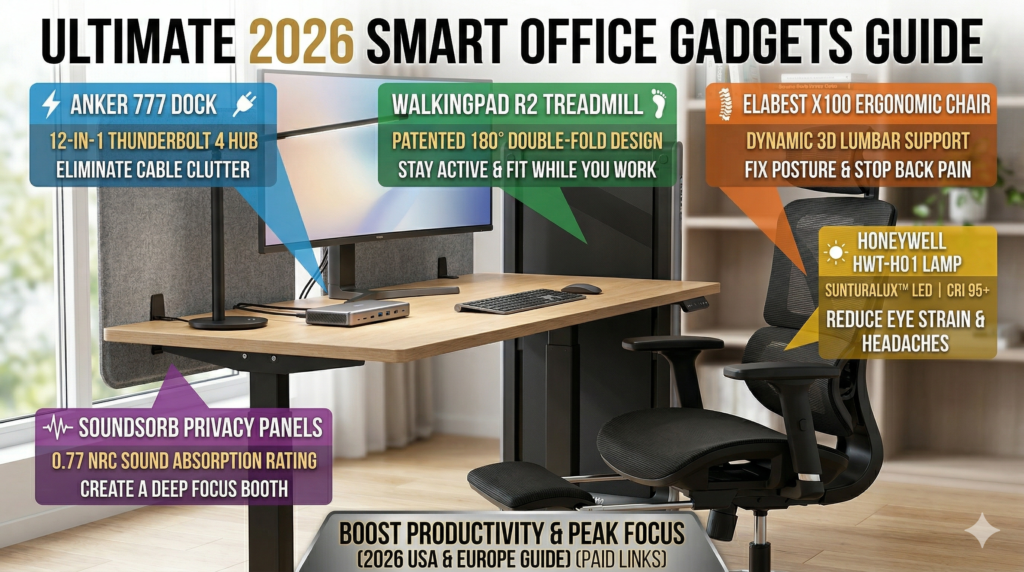
- Best Overall Productivity: Anker 777 Thunderbolt Docking Station
- Best for Health & Energy: WalkingPad R2 Foldable Treadmill
- Best Premium Lighting: Honeywell SunturaLux™
- Best Ergonomic Comfort: ELABEST X100 Ergonomic Chair
- Best for Focus: SoundSorb Desktop Privacy Panels
2026 Smart Office Comparison Table
| Product | Best For | Key Problem It Solves | Key Feature | Price Range | Action |
|---|---|---|---|---|---|
| Anker 777 Dock | Connectivity | Eliminates cable clutter | 12-in-1 Thunderbolt 4 | Mid-High ($$) | Check Price |
| WalkingPad R2 | Health & Energy | Fixes “sedentary slump” | 180° Double-Fold Design | Mid-High ($$) | Check Price |
| ELABEST X100 | Posture | Stops back/neck pain | Dynamic 3D Lumbar Support | Competitive ($) | Check Price |
| Honeywell HWT-H01 | Eye Health | Reduces eye strain | SunTuralux™ LED Technology | Budget ($) | Check Price |
| SoundSorb Panels | Focus | Blocks out noise | 0.77 NRC Acoustic Rating | Budget ($) | Check Price |
Deep Dive: The Essentials for Your Best Smart Home Office Setup
1. The Command Center: Anker 777 Thunderbolt Dock
The Problem: Managing multiple monitors, charging cables, and external drives usually leads to a “cable spaghetti” mess that slows down your laptop. The Solution: This docking station acts as a central hub, allowing you to connect everything via a single cable.
- Short Verdict: This is a heavy-duty, aluminum-cased beast. It eliminates clutter while future-proofing your setup for 2026 speeds.
- Pros: 90W laptop charging; supports dual 4K displays; industrial-grade build.
- Cons: The unit stays warm to the touch. Additionally, it has a higher price point than basic hubs.
- Best For: Power users and multi-monitor professionals.
Internal Recommendation: If you are working with a limited budget, you don’t always need the most expensive hub to stay productive. See our curated list of 4 Budget Gadgets Under $30 That Are Surprisingly Useful for affordable workspace additions.

Stop fumbling with five different cables every morning. The Pitch: This industrial-grade aluminum hub turns your laptop into a high-performance workstation with just one plug. Designed for the 2026 professional, it delivers blazing-fast Thunderbolt 4 speeds and powers dual 4K monitors effortlessly. It doesn’t just manage your desk; it reclaims your time and eliminates "tech friction" forever.
2. The Health Game-Changer: WalkingPad R2
The Problem: Sedentary work leads to lower back stiffness and a massive drop in energy levels by mid-afternoon. The Solution: The R2 allows you to maintain a steady walking pace during “low-intensity” tasks like checking emails or attending passive meetings.
- Short Verdict: TThis is the most elegant treadmill for small apartments. Because it folds 180 degrees, you can hide it under a sofa easily.
- Pros: It features a sleek metallic finish and quiet motor.
- Cons: It is not meant for high-speed running. Furthermore, the belt requires regular lubrication.
- Best For: Professionals in the USA and Europe with limited floor space.

Beat the 2 PM energy slump without leaving your desk. The Pitch: Most home offices are sedentary traps, but the WalkingPad R2 lets you hit your 10,000 steps while clearing your inbox. Its patented 180-degree folding design is a game-changer for smaller European apartments and modern US home offices alike. It’s whisper-quiet, sleek, and the most effective way to stay fit during back-to-back Zoom calls.
3. The Throne: ELABEST X100 Ergonomic Chair
You can’t be productive if your lower back is screaming. The X100 focuses on “dynamic support,” meaning it adjusts as you lean or shift, keeping your spine aligned.
- Short Verdict:You get a high-end ergonomic experience without the designer price tag.
- Pros: The breathable mesh keeps you cool. Additionally, the 4D armrests provide excellent tracking.
- Cons: Assembly takes about 30 minutes. Also, the mesh might feel firm if you prefer soft cushions.
- Why It Stands Out: In addition to the support, the inclusion of a retractable footrest in a professional-grade ergonomic chair is rare and incredibly comfortable for deep-work focus sessions.

If your back hurts by 4 PM, your chair is failing you. The X100 isn't just a seat; it’s a dynamic support system. Featuring advanced lumbar tracking that moves with your body and a retractable footrest for deep-work breaks, this chair provides the luxury feel of a high-end designer brand at a fraction of the cost. Invest in your posture today to avoid the chronic pain of tomorrow.
4. Honeywell SunturaLux™ LED Desk Lamp (HWT-H01)
Poor lighting causes headaches and eye strain. However, this lamp tracks local daylight and adjusts itself. It changes color temperature and brightness automatically. Consequently, your circadian rhythm stays in check even during late shifts.
- Short Verdict: Although it is an investment, this is likely the last desk lamp you will ever buy.
- Pros: 60-year light quality; motion sensing; USB-C charging built-in.
- Cons: The upfront cost is significant. Specifically, the app can be finicky on older routers.
- Best For: Designers, architects, or anyone working late hours.
- Best Feature: Built-in Dual USB-A & USB-C ports to charge your phone and tablet directly on your desk, keeping your workstation clutter-free.
- Why It Stands Out: Consequently, it mimics natural light so accurately that it genuinely helps reduce that “fried” feeling your eyes get after sunset.

Professional eye protection and dual-device charging in one sleek, foldable design.Most budget lamps flicker and cause long-term eye strain, but the Honeywell SunturaLux uses high-CRI (95+) full-spectrum LED beads to mimic natural sunlight. This is a game-changer for detail-oriented professionals who need color accuracy and "flicker-free" lighting for long nights. Beyond the light, it features built-in USB-A and USB-C ports, allowing you to charge your smartphone and tablet simultaneously. Its 180-degree foldable arm makes it a "space-saving genius" for compact desks in Europe and the USA alike.
5. The Focus Shield: SoundSorb Desktop Privacy Panels
In a shared house or a noisy apartment, visual and acoustic distractions are productivity killers. These panels create a “booth” feeling on any standard desk.
- Short Verdict: An underrated way to “zone” your brain into work mode while dampening echoes for better-sounding calls.
- Pros: Recycled eco-friendly material; easy to install/remove; pin-writable surface.
- Cons: Can make a small desk feel a bit cramped if not positioned correctly.
- Best For: Professionals in open-plan homes or those who do a lot of recording.
- Why It Stands Out: Simply put, it’s a low-tech solution to a high-tech problem. Sometimes physical boundaries are the best productivity hacks.

Reclaim your concentration in a noisy home. When your home becomes your office, distractions are everywhere. These SoundSorb panels create an instant acoustic "bubble," reducing household noise and visual clutter so you can enter a state of deep focus. They are eco-friendly, easy to install, and essential for anyone who needs a professional-grade "booth" feel for recording or high-stakes analysis.
USA vs. Europe: Buying Considerations for 2026
When building your setup, keep these regional factors in mind:
- Voltage Standards: First, ensure your devices are compatible with your local grid. While the USA uses 110V, Europe typically operates on 230V. Most docking stations are universal; however, you should always check the power brick before plugging it in for the first time.
- Space Constraints: European homes often prioritize multi-functional furniture. If you’re working from a small apartment, you might also find our guide on 4 Space-Saving Floating Shelves That Make Small Homes Look Amazing helpful for organizing your tech.
- Shipping & VAT: If you are ordering from the US to Europe, be mindful of import duties. These extra costs can add up quickly. Consequently, we recommend checking local storefronts like Amazon.de or Amazon.co.uk first. This strategy usually results in better localized pricing and faster delivery.
requently Asked Questions (FAQ)
Q: Is a walking pad actually worth it for work?
Yes. It keeps your heart rate slightly elevated, which improves oxygen flow to the brain and keeps you alert during long shifts.
Q: What is the best ergonomic chair for long hours in 2026?
The ELABEST X100 is our top pick for its balance of price, dynamic lumbar support, and high-quality mesh.
Q: How do I handle different plug types between US and EU gear?
Always look for “Auto-switching” power supplies. If a device is 110v only, you’ll need a heavy-duty transformer, not just a travel adapter.
Final Verdict: Ready to Upgrade?
Investing in the best smart home office setup in 2026 is about more than just buying gadgets; it’s about protecting your health and maximizing your career potential. Whether you choose the high-tech precision of the Dyson lamp or the movement-focused WalkingPad, every item on this list is designed to solve a specific remote-work problem.
Which of these upgrades will you make first? Explore more practical home ideas and space-saving solutions at SmartDealFinds.com.